Plesk domains

Point a domain alias to an existing website

A domain alias lets another domain open the same Plesk website without creating a separate document root. Decide how web, mail and redirects should behave before adding it.

One websiteSeveral domains can serve the same content.

Redirect is optionalSend visitors to the preferred domain when appropriate.

Secure every hostnameThe certificate must cover each public name.

Choose the behaviour

Alias or redirect?

An alias can display the same content on both hostnames. A permanent redirect is often clearer for visitors and search engines when one domain is the canonical public address.

Plesk setup

Add the domain alias

  1. Point the alias domain’s DNS to the hosting server.
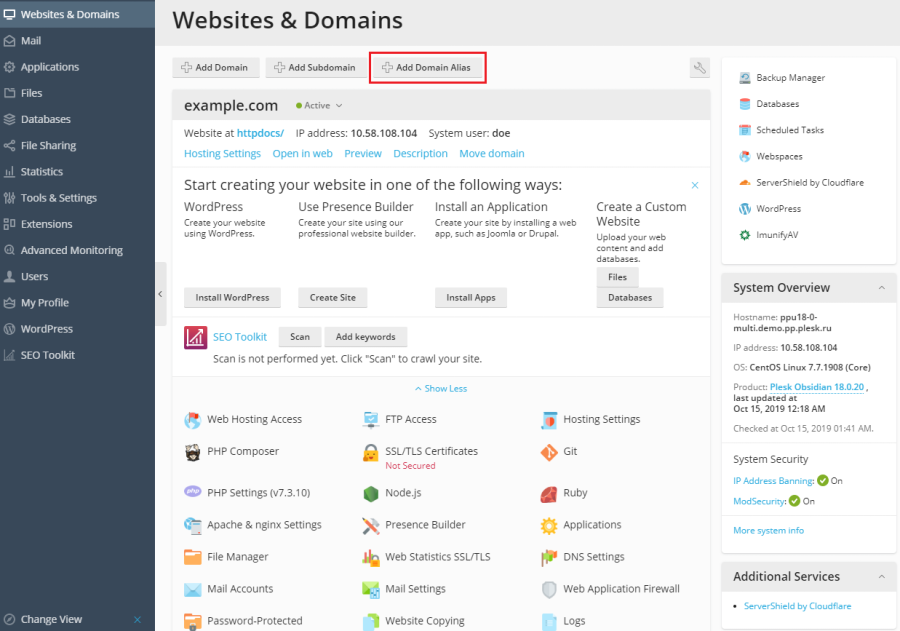
  2. In Websites & Domains, choose Add Domain Alias.
  3. Enter the alias and select the target domain.
  4. Choose web, mail and redirect options deliberately, then save.
  5. Issue or renew a certificate covering the alias and test HTTP and HTTPS.

Avoid conflicts

Do not create duplicate mail unexpectedly

Enable mail for the alias only when matching addresses should deliver to the target domain. Confirm canonical redirects and application URLs to prevent duplicate-content or login issues.

Was this answer helpful?

« Back